AI Agents for Automated Quality Assurance
By Luke Miller
- 10 minute read - 2083 wordsQuality Assurance (QA) is an intensive endeavour that feels very repetitive to humans. In this article, we explore the potential of using Agentic AI to automate this process. In particular, we’ll apply this methodology to a real-world example: ensuring that parallellm.com (the “target website”) runs smoothly, round the clock. Any issues that do arise will be flagged very quickly.
The application of Agentic AI to QA has great potential, since traditional website scanning is notoriously difficult. Their HTML layouts are liable to change at any moment. AI Agents, when set up in the right way, can tolerate such changes, whereas traditional heuristic rules are hard-coded and brittle against this effect.
We will also take the opportunity to explore the LangGraph framework, and related tools, highlighting its various features and how they can be utilized to build this automated system. Additionally, we make strong use of Selenium throughout.
Here’s an example demonstrating a full end-to-end run of this QA process on chat.parallellm.com:
This system runs on a schedule with different parameters to check for certain behaviours and, in particular, failure modes. Some ways that the platform could fail are: unable to login, a button becomes unusable or, in our case, one or more LLM models are unable to reach their backends to provide a response.
We mitigate these problems by flagging them to an appropriate administrator shortly after the problem occurs, by email or some other messenger.
Technical details
Agentic Layout
The following diagram shows a high-level view of how our graph (using LangGraph) interacts with the browser (using Selenium webdriver) throughout the flow:
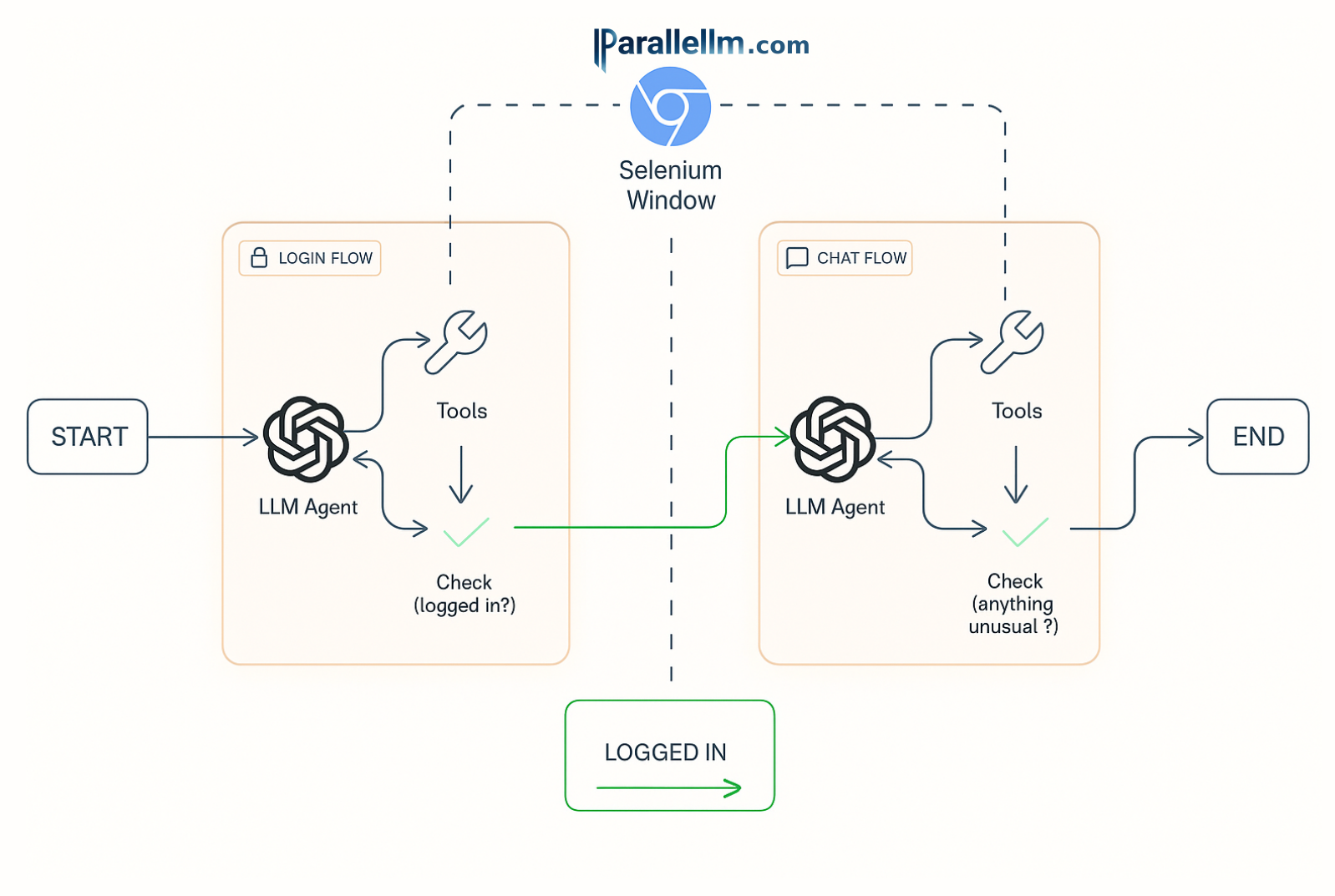
The agentic system depicted above contains two nearly-independent sub-graphs (or “flows”) that handle different parts of the process:
- The login flow, responsible for ensuring the webdriver uses the provided credentials to reach a logged-in state;
- The chat flow, which simulates a simple back-and-forth chat with the platform; 3) this part clearly requires the webdriver to be logged in, handled in part 1).
The only thing that makes these sub-graphs loosely dependent is the webdriver that interacts with the target website (chat.parallellm.com). Initially, it enters the system (at START) as a bare browser.
Part 1
The first sub-graph then navigates to the platform, and attempts to log in. At this stage, the agent has never seen the website layout before! The agent is supplied the initial state of the HTML but from there has to investigate the layout and interact with the webdriver via tools. These comprise a set of utilities that the agent (OpenAI’s GPT Mini 4.1 in this case, more on that later) can make use of to navigate its way towards the goal of getting logged in.
The tools must be tailored to each Agentic application, and get attached to the agent with LangChain’s bind_tools method.
Example tools designed for this QA system are:
- type text
- click a button
- wait
- to allow time for loading to complete
- fetch HTML
- which updates based on web interactions.
The agent is responsible for deciding whether it needs to perform another tool use (and if so, choose which one), or proceed directly to the login check (in LangGraph language, this is a conditional edge). Note that this check is performed automatically after every tool execution (a non-conditional edge).
It typically takes the agent several rounds of using tools and analysing the resulting HTML, but eventually it will manage to log in and pass the check. That is the END of that flow and the START of 2). At this point, the webdriver is guaranteed to be logged into an account on chat.parallellm.com, so we must take care to keep it open here i.e. we mustn’t close the browser!
Part 2
The webdriver is then supplied as an input to sub-graph 2) which will conduct a mini conversation with multiple LLMs. A random but small number of rounds is selected to simulate real-world usage. The agent will again use the same set of common tools to interact with the chat interface in order to have the conversation.
For example, the AI agent may decide to type “What’s your name?” into the prompt box. But it must first deduce the correct
tool to use (type_text) and also which parameters to supply in order to insert the text. This second part is not
trivial and is actually the secret sauce in agentic QA! The agent must interpret the potentially dynamic HTML and then
figure out the correct Selenium selector to use. In traditional web scraping, often brittle, hard-coded rules are used here,
but by utilizing the LLM’s background knowledge combined with the evolving web layout, we build in a layer of resilience
to this changing website landscape.
I built an extra tool for the chat flow - report_completion - which is a way that the agent can comment on the general
state of the website as it interacts with it. In this tool, the agent has to fill out two fields: an overall health flag
(which is either ‘OK’ or ‘ERROR’) and health_description to provide more details in free text. The system prompt -
a rulebook for this entire flow in free text - is crafted to ensure that the agent uses this tool once all conversation
rounds are complete. Via the tool node, the system checks for this tool use, and updates LangGraph’s global State
in order to keep a record of this health status.
Only after the conversation completes does the agent exit the loop, moving to a “completed” state.
Extending to More Sub-Graphs
This agentic example has two sub-graphs but, going further, there’s no reason other agentic workflows couldn’t contain three or more flows in order to check even more complex behaviour or navigation paths.
Common to Both Parts
I have coded this project to be as re-usable as possible. So for that reason there are utilities that are common to both
parts. For example, there is a set of common_tools that both flows can utilize when interacting with the webdriver. (Of
course, they both have their own ones, too.)
In fact, the run_login.py script is completely re-usable, so that you program it either to run alone, or use its main
function within the entire 2-part run_chats.py example.
Both sub-graphs perform common reporting functions including saving images of the webdriver, regular HTML checkpoints, and their execution traces to dedicated folders.
Each sub-graph has a long system prompt, which contains instructions that are supplied the LLM agent. Getting this descriptive enough to guide the agent to achieve the desired goal is known as prompt engineering. These prompts do differ by sub-graph, since they have different goals, but they both have one.
Finally, both sub-graph flows will copy all their reporting files to an error folder in the case that the health is
not OK. This can then be used by the monitoring process.
Monitoring
The image below depicts a high-level overview of how the monitoring of agents’ output is performed.
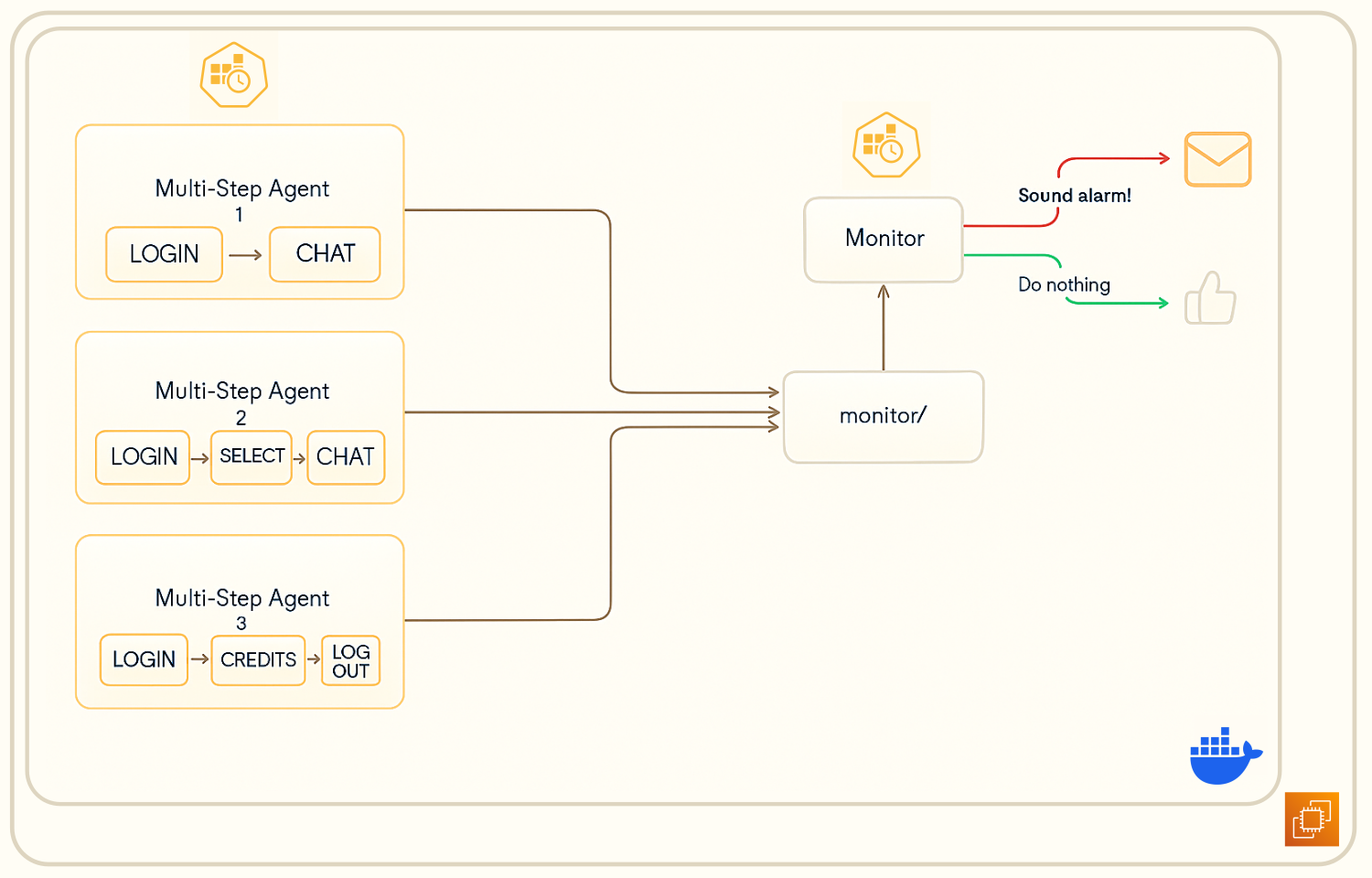
All agents for this QA system run routinely on a schedule (via cron) to complete their workflows. If the job detects that
the health of the task that it tried to complete is not right, then it will copy its entire content to a dedicated
monitor/ folder.
There is a separate (non-agentic) process that frequently checks this folder for problematic entries. In the case that it finds one, it immediately sends an email to the chosen administrator’s address, including some summarizing details about what happened and when. It will also upload the evidence files to S3. The image below shows an example of a notification that might be received were a problem to be found. The “Final Health Description” is a summary from the LLM agent itself, summarizing the entire execution trace.
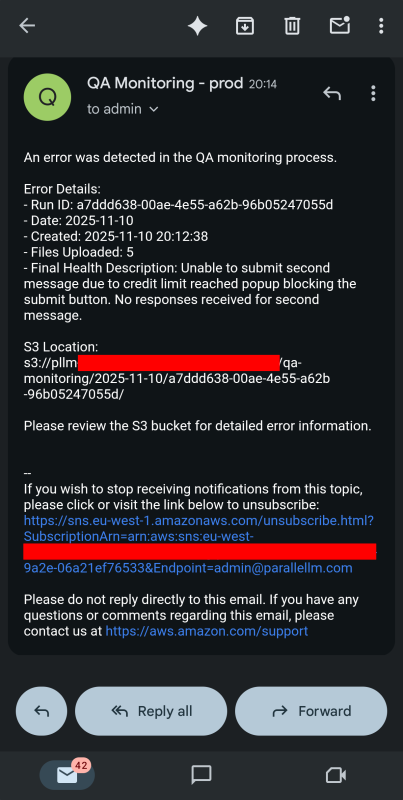
Once those resources have been sent / uploaded, this entry is deleted from the monitoring folder to prevent the notification being duplicated.
Deployment
This QA system has been Dockerized and runs on a fairly simple AWS architecture. To make this reproducible, I built it with Infrastructure as Code (IaC), making use of AWS Cloudformation to do so.
The main stack consists of:
- EC2 instance
- for hosting the agentic and monitoring Docker container
- SNS Topic
- allowing a communication channel with an email address for surfacing problems.
Note: the S3 bucket I used for uploading files to was already available and set up for other monitoring processes associated with Parallellm. It was simply a case of setting up the InstancePolicy to be allowed to publish to given prefixes on that bucket (and also allowing it to publish to the dedicated SNS Topic).
The Docker container extends a selenium base image (for Chrome), which comes with many pre-built dependencies for supporting the webdriver, that would otherwise be laborious to install yourself. The python and cron dependencies are installed on top.
Challenges and (some) Solutions
Prompt Engineering
Getting the prompt engineering right is fiddly, particularly judging how specific to be. Too much, and you risk falling into the same old trap of being too brittle, but too little and the agent won’t be able to understand the task.
Trial and error coupled with progress monitoring is the way to go here.
Too Much Context
“Too Many Requests (429)” was a constant pain point when building this system, caused by using too many tokens per minute. The problem stems from the fact that we’re throwing around quite a lot of HTML in the context window, which tends to be large and then exhausts token rates (TPMs) quickly. During development, this usually led to failing job runs.
One solution I used to minimize this effect was to significantly redact long, intermediate HTML-like messages - this turned out to be quite a useful state-management trick.
It also helped to immediately remove useless tags (e.g. <script>) and provide the HTML <body> only.
Credentials
You have to take a lot of care to ensure that you do NOT send sensitive credentials (e.g. login details) to the LLM provider, as that would be a significant security risk! We solve this through the use of a shim for just-in-time substitution.
Whilst the agent is responsible for deciding which tools (and tool parameters) to use, the actual execution is done by the local webdriver itself, which allows you to pull off this insertion trick without ever sending details to a third party.
Handling multiple sets of logins was another minor challenge, which I overcame with a profile configuration setup.
Scheduling (cron)
This point is perhaps a note to my future self and interested readers more than an inherent problem. I went along the
path of setting up the cron tasks within the docker container, but this took a lot more configuration than I had
anticipated. For example, capturing environment variable supplied as an .env file during docker run and passing them
on to processes that the crontab directs was much more challenging than I had anticipated!
I got there in the end but, in future, I would simply recommend having a global crontab on the host machine, responsible for triggering individual transient agent runs, rather than insisting it lives inside the long-running container.
Model Choice
The choice of the LLM is of course a question with no unique answer. This one was just a case of trial and error. Using larger models tended to fail, not because of inability, but because they burnt many output tokens during the “thinking” process. In combination with the large context length for these tasks, that meant that minute-wise token limits were reached too quickly. (GPT 4.1 also has a much more restrictive TPM than models mentioned below.)
On the other hand, the “nano”-type models were unable to reason well enough, or struggled with the large context windows, and would not be able to do basic tasks, such as finding the ’login’, button in a reasonable number of turns. For this reason, these agents tended to bump into the global recursion limit set by LangGraph.
Eventually, I settled for OpenAI’s GPT 4.1 Mini, seemingly as a compromise between these two extremes.
There is no one answer for this question, as it strongly depends on the use case, and will always require experimentation by a practitioner.
Further Enhancements (Next Steps)
- Build out more agents that check more functionality, e.g. billing.
- Analyse the long-term success rate of this agentic pipeline, and perform an ablation on the choice of model type.
- Ensure full reproducibility by creating an automatic install script for EC2.
- Apply agentic QA monitoring to other target websites, such XKCD Finder.