AI Tools for Live Transcription
By Luke Miller
- 8 minute read - 1578 wordsAI tools for automated speech recognition (ASR), otherwise known as transcription, have become quite popular recently, especially with the advent of Wispr Flow, for example. There are several free alternatives to that which I wanted to experiment with in my workflow. I’d also like to offer and introduce a custom option of my own - Whisper Clip - which is free to run locally, and very performant with the right hardware.
The promise from these tools is huge because you can gain up to a 3x speed up compared with typing and it also prevents constant typing pressure which could prevent RSIs.
If you find this article informative, please drop a star on the supporting GitHub project page ⭐
Whisper Clip: Overview
I have a specific set of needs when it comes to live voice transcription and those are:
- runs locally i.e. no web servers,
- initiated at the press of a button (no time wasted changing program),
- very minimal lag.
After some research into pre-existing programs that satisfy these conditions, I couldn’t find anything obvious that satisfies all three, not at least without some significant tweaking (or forking). So I decided to roll my own. There are some candidates out there that get quite close - I’ll discuss those below - but nothing was perfect. So, here’s how Whisper Clip works at a glance.
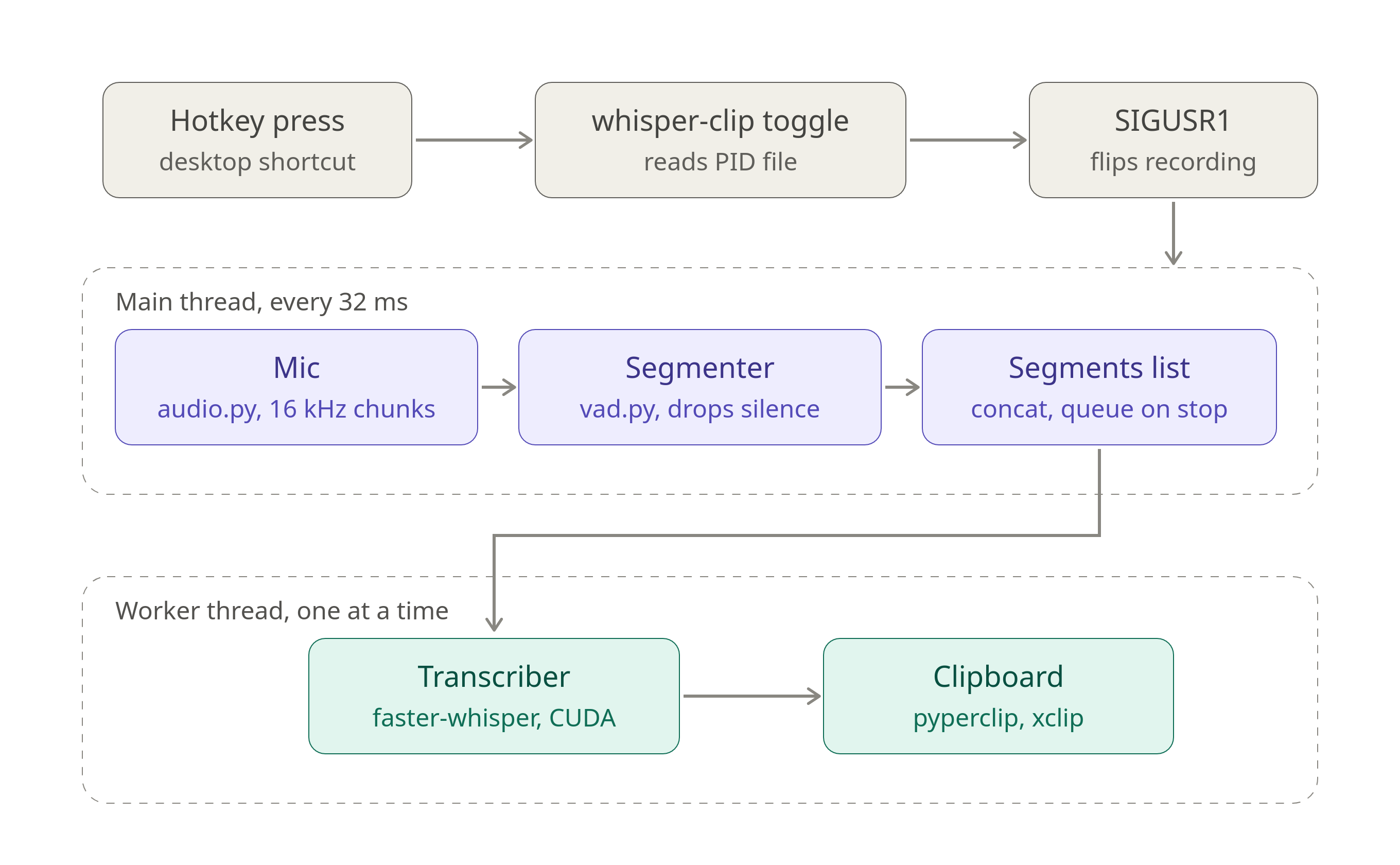
Once installed and running, you press a hotkey of your choice (e.g. F14 for me), which turns the recording on. The mic starts to send audio chunks over to the program, discarding any silent segments. When you press the hotkey again, the non-trivial audio chunks are collected and passed it to the transcriber running OpenAI’s Whisper model (though you can configure the exact model). That finally gets passed onto the clipboard where you can paste it directly to wherever you’re working.
This workflow gives it a very usable feel, where pauses and corrections are handled seamlessly. It’s also able to handle technical jargon too, such as “HTML”, “systemd”, “VRAM”, “Kubernetes”, “PyTorch”, and so on.
Technical Details & Hardware Requirements
At the time of writing, Whisper was the last transcription model to be open source by OpenAI in 2024. It does offer other
newer models, but only behind the paywall that requires an API key, and therefore require both web interaction and payment.
For that reason, we use the Whisper model (large-v3-turbo) at the heart of our Whisper Clip transcription system.
At around 809 million parameters the Whisper model1 occupies around 2GB of (V)RAM and because of its size it should really be run on a GPU-backed machine. (A CPU configuration is possible but will inevitably cause detrimental lag when transcribing.) If you were toset it up to load it from boot (using systemd installation instructions below), then it would permanently use this memory footprint, but with the upside that transcription is available immediately whenever you turn your machine on.
Whisper Clip uses Silero Voice Activation Detection (VAD), a tiny neural network for predicting whether there’s speech, in order to separate the spoken segments from silence. The VAD Segmenter is responsible for building up a collection of chunks containing real speech. This allows us to remove the silence prior to transcription, which keeps the overall processing burden - and the lag - down.
The transcription is actually handled by the now-popular faster-whisper package, whose WhisperModel class has a handy .transcribe()
method. This does have the (minor) downside that this project supports NVIDIA-type GPUs only, with a CPU fallback. (Macs typically have
transcription tools built into their OS anyway.)
The final transcribed text is passed to the clipboard via pyperclip.copy(). That way it is available to paste immediately wherever
you are in your system.
Installation & Runtime
The main installation instructions can be found in the dedicated GitHub repo, but the main steps are:
- install project dependencies into a virtual environment
- manually run the main daemon first for downloading the models and testing
- set up the hotkey as a keyboard shortcut (my choice is F14)
- test it works at this stage
- for best results, migrate the daemon to systemd (loads on boot, always on)
- reboot and test.
I have tested this on Ubuntu with NVIDIA drivers already installed. It should transfer to other Linux distros, but some finer details may need ironing out.
For best results, use NVIDIA GPU. The configuration can be tweaked at whisper_clip/config.py.
Alternatives
WhisperLiveKit
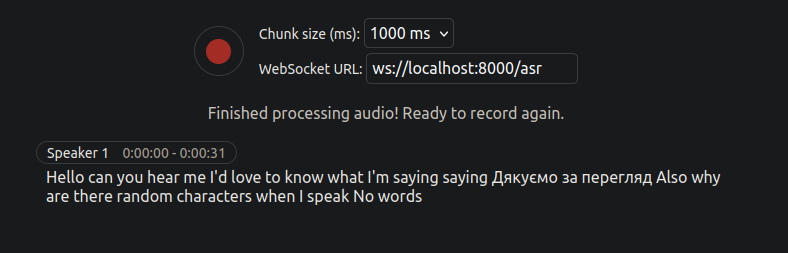
This is a great open-source project that’s actively maintained and is great for a several transcription use cases (including multi-person diarization for keeping meeting notes). As the name suggests, it also uses OpenAI’s Whisper model. It runs with a nice frontend from your browser so that you can see text appearing as it’s transcribed.
If you have a GPU, you can run it locally with no lag issues. Otherwise, you can use an OpenAI API key to get it to contact servers. But that is, of course, a paid option, and as usual going over the wire does introduce a perceptible amount of lag.
I did not end up adopting this project in my workflow because I didn’t want to constantly interact with the browser, preferring a hotkey solution.
Vosk
This is the open source project I reached for originally when first attempting to get local transcription working on my own machine (CPU-only at that time). It’s more lightweight because it uses a hybrid pipeline mixing a relatively small neural network (the acoustic model2) together with a statistical decoding graph, making it use far less FLOPs overall per audio segment when compared to Whisper (which is a large, end-to-end neural-network).
Vosk is great because it works with a variety of languages and has a choice of model sizes. However, the small version of the model is really the only choice that works without lag on a CPU-enabled machine. This means it has a few downsides including a limited vocabulary (no technical jargon available, for example), it can only make use of short, local context rather than an utterance-wide context, and therefore has a higher word-error rate (WER). It also has poor formatting, emitting only lower-case letters without punctuation.
Another project of mine, vosk-dictation, added a post-processing step to Vosk transcripts via an LLM. That worked to some extent but
couldn’t fix all errors and had the flaw of requiring a non-local LLM in the loop. It’s a valid route for machines with a CPU only, but you might find yourself
having to do a significant amount of manual post-processing. At the time of writing this project has clipboard integration but no hotkey initiation.
Other Notable Projects
Below are another set of projects and services that should not go without mention:
WhisperLive
This is well-maintained and well-loved project (with 4.3k GitHub stars) that can transcribe live or on supplied audio files. It predominantly runs from the terminal where the text is delivered, but can be configured to work in browser with a local websocket. It is similar in spirit to WhisperLiveKit, but it does not support the API-key option, meaning it would only really run on a GPU machine.
The transcribed text is delivered to the terminal (or browser), meaning that clipboard delivery needs an extra program. There is no hotkey option, transcribing whenever the server is running.
OpenWhisper
This is an up-and-coming open-source project that provides a standalone app for live dictation, running the Whisper model locally. Once again, it is similar in spirit to WhisperLiveKit, and it’s arguably more feature-rich since it records with a hotkey and delivers straight to the clipboard.
The app is overkill if you’re happy with a background process (as in Whisper Clip).
Wispr Flow
This is a freemium cloud-hosted service that runs as a background app on your laptop or mobile. You can enable transcription with a hotkey, then after a couple of second it will paste the text to wherever your cursor is.
Accuracy is high enough to require few post edits, but there have reportedly been some issues around privacy, particularly with its Context Awareness feature.
There is a free tier (2000 words per month), but for any amount of serious usage you’ll almost certainly have to upgrade to the paid tier (~£10 for unlimited usage).
MacOS
If you’re on a Mac, you could use the native Dictation tool. When you have Apple Silicon (M-series) it runs entirely locally, otherwise it’s processed by Apple servers.
This is clearly not possible for Linux users.
Next Steps
Below are several potential new directions to take the project in future:
- Introduce a dedicated wake word to replace the two hotkey presses.
- Integrate other vocal ‘plugins’ (e.g. a dedicated emoji search program, triggered by its own wake word).
- Extend to non-NVIDIA systems.
Conclusion
This article is intended to give you give a broad overview of the landscape of open-source tools for live transcription. It also introduces my own offering - Whisper Clip - which I use daily for productivity boosts.
If you’ve found this article informative, please drop a star on the supporting GitHub project page ⭐
P.S. I’m very happy to announce that this is the first blog article I’ve written entirely (or perhaps predominantly) by voice dictation!
-
Radford, A., Kim, J. W., Xu, T., Brockman, G., McLeavey, C., & Sutskever, I. (2023, July). Robust speech recognition via large-scale weak supervision. In International conference on machine learning (pp. 28492-28518). PMLR. ↩︎
-
Povey, D. et al., “Semi-orthogonal low-rank matrix factorization for deep neural networks” (2018). Interspeech. ↩︎